
( ! ) Warning: Packets out of order. Expected 1 received 0. Packet size=30 in /home/ed3scom/public_html/wp-includes/class-wpdb.php on line 2351
Call Stack
#TimeMemoryFunctionLocation
10.0001390808{main}( ).../index.php:0
20.0002392280require( '/home/ed3scom/public_html/wp-blog-header.php ).../index.php:17
30.0003403608require_once( '/home/ed3scom/public_html/wp-load.php ).../wp-blog-header.php:13
40.0004414888require_once( '/home/ed3scom/public_html/wp-config.php ).../wp-load.php:50
50.0014544056require_once( '/home/ed3scom/public_html/wp-settings.php ).../wp-config.php:102
60.190437150224include_once( '/home/ed3scom/public_html/wp-content/plugins/download-monitor/download-monitor.php ).../wp-settings.php:589
70.190637164240require_once( '/home/ed3scom/public_html/wp-content/plugins/download-monitor/includes/bootstrap.php ).../download-monitor.php:61
80.193937551784require_once( '/home/ed3scom/public_html/wp-content/plugins/download-monitor/includes/admin/wpchill/class-wpchill-upsells.php ).../bootstrap.php:37
90.193937551784class_exists( $classname = 'WPChill_Remote_Upsells' ).../class-wpchill-upsells.php:7
100.193937551872spl_autoload_call( $class_name = 'WPChill_Remote_Upsells' ).../class-wpchill-upsells.php:7
110.193937551960Composer\Autoload\ClassLoader->loadClass( $class = 'WPChill_Remote_Upsells' ).../class-wpchill-upsells.php:7
120.193937551960Composer\Autoload\{closure:/home/ed3scom/public_html/wp-content/plugins/download-monitor/vendor/composer/ClassLoader.php:575-577}( $file = '/home/ed3scom/public_html/wp-content/plugins/download-monitor/vendor/composer/../../includes/admin/wpchill/class-wpchill-upsells.php' ).../ClassLoader.php:427
130.194337591224include( '/home/ed3scom/public_html/wp-content/plugins/download-monitor/includes/admin/wpchill/class-wpchill-upsells.php ).../ClassLoader.php:576
140.194337656760WPChill_Remote_Upsells::get_instance( $args = ['api_url' => 'https://wp-modula.com/wp-json/upsells/v1/get'] ).../class-wpchill-upsells.php:470
150.194337656888WPChill_Remote_Upsells->__construct( $args = ['api_url' => 'https://wp-modula.com/wp-json/upsells/v1/get'] ).../class-wpchill-upsells.php:102
160.194437659008WPChill_Remote_Upsells->load_active_promotions( ).../class-wpchill-upsells.php:79
170.194437659008get_option( $option = 'wpchill_upsells_data', $default_value = [] ).../class-wpchill-upsells.php:112
180.194637659384wpdb->get_row( $query = 'SELECT option_value FROM wp_options WHERE option_name = \'wpchill_upsells_data\' LIMIT 1', $output = ???, $y = ??? ).../option.php:206
190.194637659384wpdb->query( $query = 'SELECT option_value FROM wp_options WHERE option_name = \'wpchill_upsells_data\' LIMIT 1' ).../class-wpdb.php:3069
200.194735478408wpdb->_do_query( $query = 'SELECT option_value FROM wp_options WHERE option_name = \'wpchill_upsells_data\' LIMIT 1' ).../class-wpdb.php:2265
210.194735478408mysqli_query( $link = class mysqli { public $affected_rows = -1; public $client_info = 'mysqlnd 7.4.7'; public $client_version = 70407; public $connect_errno = 0; public $connect_error = NULL; public $errno = 2006; public $error = 'MySQL server has gone away'; public $error_list = [0 => [...]]; public $field_count = 2; public $host_info = 'Localhost via UNIX socket'; public $info = NULL; public $insert_id = 0; public $server_info = '5.5.5-10.1.41-MariaDB'; public $server_version = 100141; public $sqlstate = 'HY000'; public $protocol_version = 10; public $thread_id = 4144; public $warning_count = 0 }, $query = 'SELECT option_value FROM wp_options WHERE option_name = \'wpchill_upsells_data\' LIMIT 1' ).../class-wpdb.php:2351

( ! ) Warning: Cannot modify header information - headers already sent by (output started at /home/ed3scom/public_html/wp-includes/class-wpdb.php:2351) in /home/ed3scom/public_html/wp-content/plugins/download-monitor/src/DownloadHandler.php on line 386
Call Stack
#TimeMemoryFunctionLocation
10.0001390808{main}( ).../index.php:0
20.0002392280require( '/home/ed3scom/public_html/wp-blog-header.php ).../index.php:17
34.9438149307872wp( $query_vars = ??? ).../wp-blog-header.php:16
44.9438149307904WP->main( $query_args = '' ).../functions.php:1343
54.9438149307904WP->parse_request( $extra_query_vars = '' ).../class-wp.php:821
64.9447149357904do_action_ref_array( $hook_name = 'parse_request', $args = [0 => class WP { public $public_query_vars = [...]; public $private_query_vars = [...]; public $extra_query_vars = [...]; public $query_vars = [...]; public $query_string = ''; public $request = '14252'; public $matched_rule = '([0-9]+)(?:/([0-9]+))?/?$'; public $matched_query = 'p=14252&page='; public $did_permalink = TRUE }] ).../class-wp.php:418
74.9447149357904WP_Hook->do_action( $args = [0 => class WP { public $public_query_vars = [...]; public $private_query_vars = [...]; public $extra_query_vars = [...]; public $query_vars = [...]; public $query_string = ''; public $request = '14252'; public $matched_rule = '([0-9]+)(?:/([0-9]+))?/?$'; public $matched_query = 'p=14252&page='; public $did_permalink = TRUE }] ).../plugin.php:570
84.9447149357904WP_Hook->apply_filters( $value = '', $args = [0 => class WP { public $public_query_vars = [...]; public $private_query_vars = [...]; public $extra_query_vars = [...]; public $query_vars = [...]; public $query_string = ''; public $request = '14252'; public $matched_rule = '([0-9]+)(?:/([0-9]+))?/?$'; public $matched_query = 'p=14252&page='; public $did_permalink = TRUE }] ).../class-wp-hook.php:365
94.9447149358656DLM_Download_Handler->handler( class WP { public $public_query_vars = [0 => 'm', 1 => 'p', 2 => 'posts', 3 => 'w', 4 => 'cat', 5 => 'withcomments', 6 => 'withoutcomments', 7 => 's', 8 => 'search', 9 => 'exact', 10 => 'sentence', 11 => 'calendar', 12 => 'page', 13 => 'paged', 14 => 'more', 15 => 'tb', 16 => 'pb', 17 => 'author', 18 => 'order', 19 => 'orderby', 20 => 'year', 21 => 'monthnum', 22 => 'day', 23 => 'hour', 24 => 'minute', 25 => 'second', 26 => 'name', 27 => 'category_name', 28 => 'tag', 29 => 'feed', 30 => 'author_name', 31 => 'pagename', 32 => 'page_id', 33 => 'error', 34 => 'attachment', 35 => 'attachment_id', 36 => 'subpost', 37 => 'subpost_id', 38 => 'preview', 39 => 'robots', 40 => 'favicon', 41 => 'taxonomy', 42 => 'term', 43 => 'cpage', 44 => 'post_type', 45 => 'embed', 46 => 'post_format', 47 => 'download', 48 => 'download-id', 49 => 'dlm_download_category', 50 => 'dlm_download_tag', 51 => 'rest_route', 52 => 'sitemap', 53 => 'sitemap-subtype', 54 => 'sitemap-stylesheet', 55 => 'mailpoet_email', 56 => 'mailpoet_page', 57 => 'dlm-ajax', 58 => 'download', 59 => 'download-id', 60 => 'mailpoet_public_email', 61 => 'sitemap', 62 => 'sitemap_n', 63 => 'yoast-sitemap-xsl', 64 => 'jetpack_form_preview', 65 => 'jetpack_form_preview_nonce']; public $private_query_vars = [0 => 'offset', 1 => 'posts_per_page', 2 => 'posts_per_archive_page', 3 => 'showposts', 4 => 'nopaging', 5 => 'post_type', 6 => 'post_status', 7 => 'category__in', 8 => 'category__not_in', 9 => 'category__and', 10 => 'tag__in', 11 => 'tag__not_in', 12 => 'tag__and', 13 => 'tag_slug__in', 14 => 'tag_slug__and', 15 => 'tag_id', 16 => 'post_mime_type', 17 => 'perm', 18 => 'comments_per_page', 19 => 'post__in', 20 => 'post__not_in', 21 => 'post_parent', 22 => 'post_parent__in', 23 => 'post_parent__not_in', 24 => 'title', 25 => 'fields']; public $extra_query_vars = []; public $query_vars = ['p' => '14252', 'page' => '']; public $query_string = ''; public $request = '14252'; public $matched_rule = '([0-9]+)(?:/([0-9]+))?/?$'; public $matched_query = 'p=14252&page='; public $did_permalink = TRUE } ).../class-wp-hook.php:341
104.9449149384136header( $header = 'X-dlm-no-waypoints: true' ).../DownloadHandler.php:386
حل مشكلة تفعيل الواتساب بلس في الاندرويد بروت
الاجهزة الذكية

حل مشكلة تفعيل الواتساب بلس في الاندرويد بروت

هل واجهت مشكلة في تثبيت الواتساب بلس وتفعيله في جهاز اندرويد يحتوي على روت Root ؟

هناك العديد من المشاكل التي واجه مستخدمي الواتساب بلس على منصة الاندرويد ليس فقط الاجهزة التي تحتوي على روت بل التي لا تحتوي على روت ايضاً واهم مشكلة والاكثر هي مشكلة تفعيل رقمك في الواتس اب ، أو ماتسمى بالتحقق من رقمك في الواتساب بلس .

من الحلول التي طرحناها لهذه المشكلة :

طبعاً الحل الاول هو حل شامل لكافة الاجهزة التي تعمل بنظام الاندرويد .

وفي حالة عدم امكانية ذلك عليك باتباع الحل التالي ولكنه يعمل على الاندرويد الذي يحتوي على رووت ، والطريقة تم اقتباسها من الاخ ماجد الرفاعي بواسطة استخدام تطبيق تيتانيوم Titanium .

طبعاً تطبيق Titanium تايتانيوم يتطلب روت على الاندرويد ومهمة هذا التطبيق هو عمل نسخة احتياطية لكافة التطبيقات او بعضها كما تشاء .


شرح طريقة تفعيل الواتساب بلس في الاندرويد بروت ROOT

ثبت تطبيق تيتانيوم Titanium من متجر قوقل من هنا .

اذا كان لديك الواتساب بلس قم بحذفه ، وثبت الواتساب الرسمي من هنا ، ثم قم بالدخول الى الواتساب الرسمي وتفعيل رقمك في الواتساب .

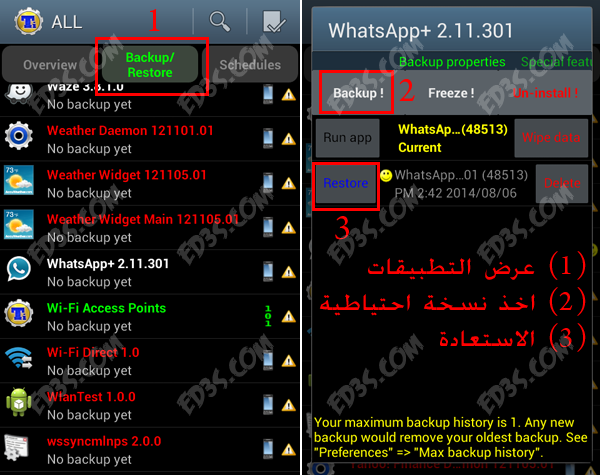
الآن عليك بتشغيل تطبيق Titanium وسيطلب منك منحه صلاحيات الروت وافق وامنحه ذلك ثم ابحث عن تطبيق الواتساب Whatsapp وقم بعمل نسخة احتياطية Backup منه ( 1 + 2 )
حل مشكلة تفعيل الواتساب بلس في الاندرويد بروت

بعد اخذ نسخة احتياطية من الواتساب الرسمي ، سنقوم بحذفه ثم تثبيت الواتساب بلس .

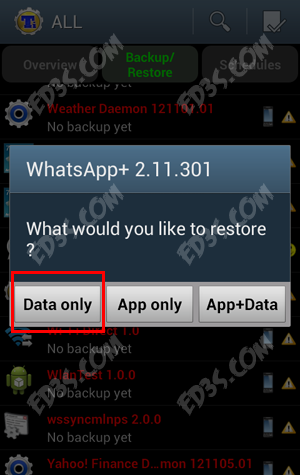
بعد ذلك سنتوجه الى تطبيق Titanium مرة اخرى وذلك لاسترجاع النسخة الاحتياطية ، ولكن هذه المرة سنقوم باسترجاع البيانات Data فقط ، نتبع الخطوات في الصورة السابقة (1 + 3 ) نستعرض التطبيقات ثم نختار الواتساب بلس ثم نقوم بالضغط على Restore ، وستأتيك رسالة كما في الصورة التالية اختر منها Data only
حل مشكلة تفعيل الواتساب بلس في الاندرويد بروت


سيتم استعادة البيانات فقط وستجد ان الواتساب بلس مُفعّل لديك .



الاشتراك في النشرة البريدية
اشترك في المجموعة البريدية لتصلك آخر المقالات على البريد الالكتروني
سيتم ارسال بريد الكتروني لتأكيد الاشتراك

اقرأ المقالات

اترك تعليقاً

لن يتم نشر عنوان بريدك الإلكتروني. الحقول الإلزامية مشار إليها بـ *

زر الذهاب إلى الأعلى